

Aiarty Updates Video Enhancer v3.5 and Image Enhancer v3.9 with New Face Restoration, HDR, and Optimized Workflow
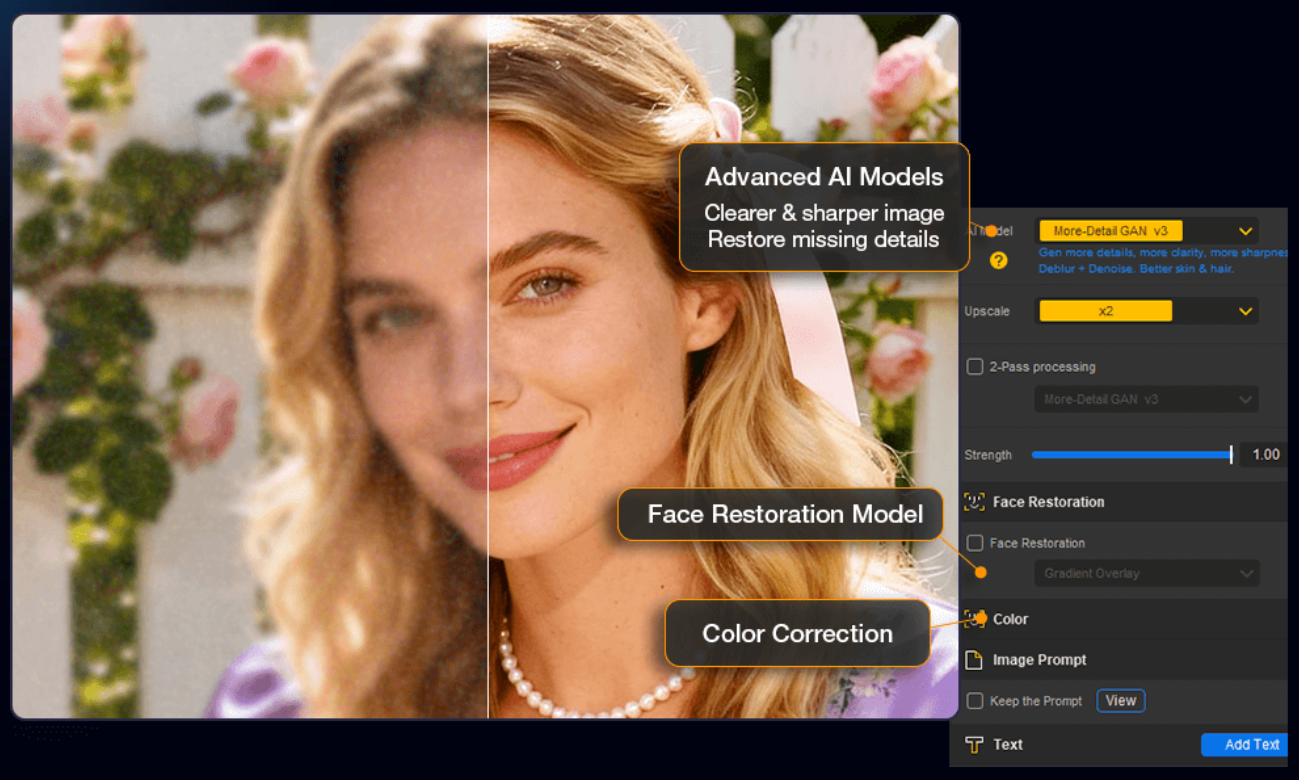
Aiarty Image Enhancer Interface
Aiarty releases Image Enhancer v3.9 with new face restoration and SDR to HDR, and Aiarty Video Enhancer v3.5 with HDR controls and workflow improvements.
CHENGDU, CHINA, February 3, 2026 /EINPresswire.com/ -- Aiarty, the AI-focused brand of Digiarty Software, today announced updates to Aiarty Image Enhancer v3.9 and Aiarty Video Enhancer v3.5, introducing refined HDR controls, improved face restoration for photos, and workflow optimizations.
The new updates underscore Aiarty's focus on practical media quality enhancement and efficient local processing. Both updates introduce features requested by photographers, videographers, content creators, and general users working with modern projects and long kept photo and video archives.
What's New in Aiarty Image Enhancer v3.9
Version 3.9 introduces a new Face Restoration AI model optimized for low resolution images and old portraits. The model improves facial details while offering Fidelity and Rebuild options, which prioritize faithful restoration or rely more on AI inference to reconstruct facial features.
The release also adds SDR to HDR image conversion, expanding color depth for more immersive visuals. Images can be fine-tuned using strength and color controls to maintain a natural look.
Together, these updates position Aiarty Image Enhancer as:
• A dedicated desktop-based photo quality and image upscaler
• With AI models to enhance photo quality, restore faces, or erase unwanted objects
• Upscale to 4K, 8K, 16K and higher for print, large display, and sharing
• Option to adjust strength to a natural look, avoid over-sharpening
Download Aiarty Image Enhancer: https://www.aiarty.com/ai-image-enhancer/?ttref=w4bd-aiverele-lyq2602-enpr
What's New in Aiarty Video Enhancer v3.5
Version 3.5 expands HDR flexibility with a new strength adjustment slider. This control allows users to fine tune the intensity of HDR effects to suit different footage types, from indoor family videos to outdoor travel and landscape clips.
Workflow updates include an optional automatic system shutdown after batch processing, a clearer export layout with advanced shortcuts, and faster importing through copy and paste shortcuts.
These updates position Aiarty Video Enhancer as:
• A professional desktop video enhancer powered by AI models
• Support upscaling to 2K, UHD 4K, or for enhancing overall quality
• Adjust AI enhancement or HDR strength for the intended look
• Optional to adjust colors, frame rate, and enhance audio quality
Download Aiarty Video Enhancer: https://www.aiarty.com/ai-video-enhancer/?ttref=w4bd-aiverele-lyq2602-enpr
"Our recent updates focus on giving users clearer control over enhancement intensity while keeping workflows efficient and predictable," said Jack Han, CEO of Digiarty Software. "These improvements are driven by how people actually restore and prepare photos and videos for long term use."
Both tools continue the commitment to secure, offline processing on Windows and macOS systems, using GPU acceleration on Nvidia, AMD, Intel, and Apple Silicon hardware. This approach keeps media secure while maintaining consistent performance for long projects and large archives.
Best Practices for Using Aiarty Image Enhancer
1) Aiarty Image Enhancer offers multiple AI models designed for different image types and scenarios. Selecting the appropriate model helps maintain natural results and reduces unnecessary processing.
For real photographs, digital images, old photos, and web downloads:
• The Real-Photo model provides balanced clarity and fidelity, reducing noise while keeping textures.
• The More-Detail model is suited for sharper textures, such as skin, hair, or fabrics details.
• The AIGCsmooth model is for AI generated or digital artwork where smoother surfaces are preferred.
2) Face Restoration is best enabled when facial details are visibly degraded, such as in old, soft, or low-resolution portraits. The Fidelity option prioritizes resemblance to the original image, while the Rebuild option applies stronger AI inference.
3) When converting SDR images to HDR, moderate strength values combined with color adjustments help maintain realistic contrast.
4) For large images or limited hardware, adjusting Max Tile Size in settings can balance processing speed and visual consistency, with Auto serving as a practical starting point.
Explore best practices with test images:
https://www.aiarty.com/ai-image-enhancer/images-for-test.htm?ttref=w4bd-aiverele-lyq2602-enpr
Best Practices for Using Aiarty Video Enhancer
1) Using the feature toggles, users can choose to upscale video or apply only specific processes such as color correction, frame interpolation, or audio denoise, depending on the footage requirements.
2) Strength Control in Aiarty Video Enhancer allows adjustment of enhancement intensity based on footage quality and intended output. Higher values can improve clarity in heavily compressed or low-light clips, while lower values help preserve the original look while restoring details.
3) For SDR to HDR video conversion, selecting the appropriate HDR mode helps tailor results. Using the HDR strength slider alongside color controls helps avoid over-processing.
Explore best practices with test videos:
https://www.aiarty.com/ai-video-enhancer/videos-for-test.htm?ttref=w4bd-aiverele-lyq2602-enpr
Availability
Aiarty Image Enhancer v3.9 and Aiarty Video Enhancer v3.5 are available now for Windows and macOS systems.
The latest Aiarty software can be downloaded from Aiarty Official Download Center.
New and existing users are welcome to explore the latest versions to restore family photos and home videos, enhance travel footage, prepare social media and client deliverables, refine AI-generated visuals, and preserve long-term personal archives.
About Aiarty
Aiarty is the AI-focused innovation brand from Digiarty Software, dedicated to developing cutting-edge multimedia solutions. With a talented team of passionate engineers dedicated to pushing boundaries, Aiarty develops cutting-edge AI tools meticulously crafted to elevate digital experiences worldwide.
About Digiarty Software
Digiarty Software, the developer of Aiarty, WinXDVD, and VideoProc, is a leading provider of multimedia software solutions for over 20 years. Renowned for their unwavering commitment to quality, performance, and customer satisfaction, Digiarty boasts a diverse software suite encompassing DVD backup, iPhone management, video transcoding, editing, and more. The comprehensive offering has garnered over 256 million software installations across 180 countries. To get more info about the company, please visit its official web page: https://www.aiarty.com/
WANG LI
Digiarty Software
+86 134 3847 4002
email us here
Visit us on social media:
LinkedIn
Instagram
Facebook
YouTube
TikTok
X
Legal Disclaimer:
EIN Presswire provides this news content "as is" without warranty of any kind. We do not accept any responsibility or liability for the accuracy, content, images, videos, licenses, completeness, legality, or reliability of the information contained in this article. If you have any complaints or copyright issues related to this article, kindly contact the author above.
